Controller services can only be used within the scope where they are defined. This article explains how availability, scoping, and inheritance work across the Root Canvas and nested process groups so you can place controller services correctly and avoid surprises in larger flows.
What this means
It is best we use an example for this. One of the most common Controller Services is the SSL Context Service. This service provides Clockspring with the truststore and/or keystore that will be used for validating SSL certificates (truststore) or for using assigned SSL certificates (keystore). These shared configurations behave like reusable building blocks that processors plug into.
By defining these stores at the Controller Services level, we do not have to fill in the truststore/keystore information at the individual processor, we just simply tell it to use this shared Controller Service and it will read from that service.
As another example - when interacting with a database, we have to define the database connection string, the driver, user information, and many other pieces of information so that Clockspring knows where and how to connect to the database. Rather than having each database processor configured individually with this data, we can set up a DBCPConnectionPool service where we will define this information and then each individual processor can just reference this service for connection details. Each processor simply references the DBCPConnectionPool instead of storing its own connection details.
Controller Service Availability
Controller Services for use by processors in your dataflow must be defined in the configuration of the root canvas or sub-process group(s) where they will be used. This means that if you set up a controller service within a process group, that service is ONLY available to that process group or its child process groups. If you go back to the root canvas or any other process group this service will not be available. However, if you define a controller service in the root canvas it will be made available in all child process groups. Inheritance always flows downward. A child can see its parent’s controller services, but a parent cannot see a child’s.
See below for a scenario of nested Controller Services:
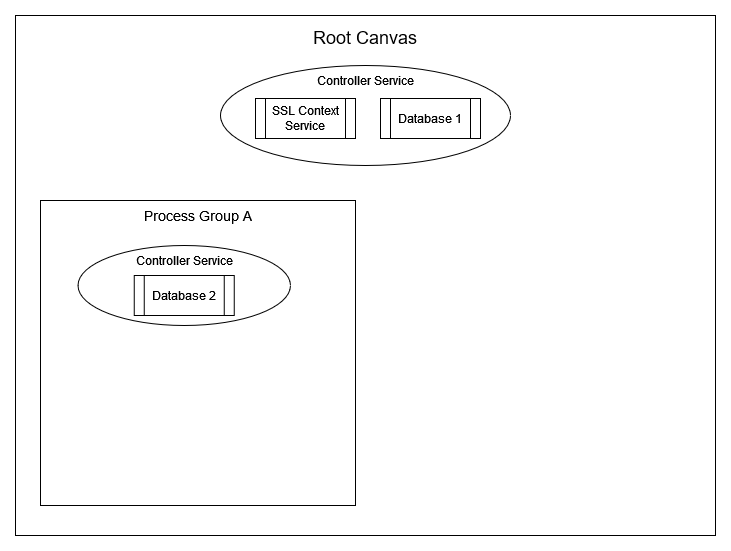
In this scenario we have 2 Controller Services set at the Root Canvas level - SSL Context Service and Database 1. These services are available to every process group within Clockspring as they are defined on the Root Canvas level. (You can consider this the parent to all processors in Clockspring).
Next we have Process Group A. This Process Group has a single Controller Service configured that allows access to Database 2. In this situation - any processor created within Process Group A will be able to use Database 2 due to its direct relationship but it can leverage Database 1 as well as the SSL Context Service due to inheritance from the Root Canvas.
Now if we add a child process group named Process Group 1 within Process Group A we can also increase this inheritance.
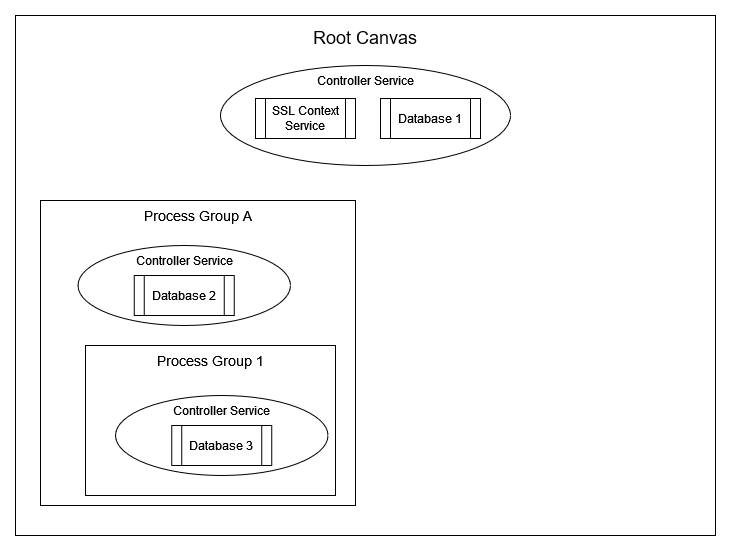
Within this sub-group we also have another Controller service configured here for access to Database 3.
In this situation - any processor created within Process Group 1 will be able to use it's configured Database 3 as well as those in it's inherited parent which are Database 1, Database 2, and SSL Context Service. However, Process group A can only access Database 2, Database 1 and the SSL Context Service - NOT Database 3, since Process Group 1 is the child of Process Group A. Child groups inherit permissions from their parent, but that is not true in the inverse.
Now, for the final layer of relationships, lets make another process group named Process Group B in the Root Canvas that will have it's own controller services defined.
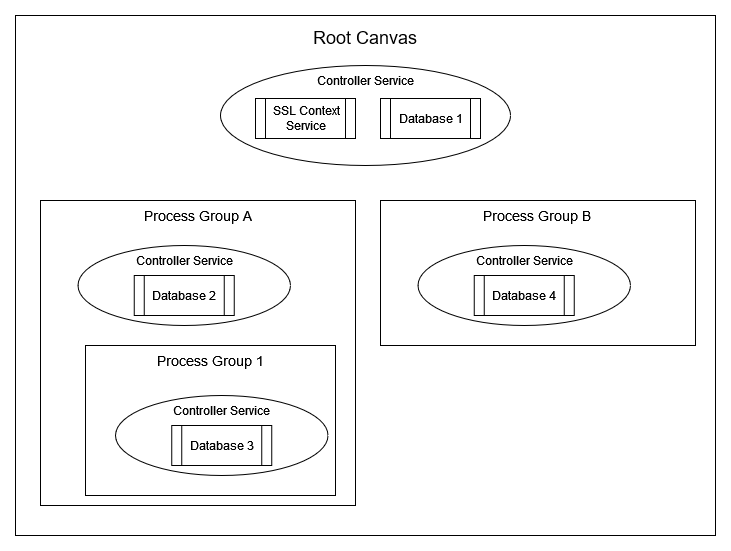
Process Group B is configured with it's own Controller Service for Database 4. This process group can access Database 1 and Database 4 as well as the SSL Context Service.Process Group A (and its children) and Process Group B are siblings. They do not inherit from each other and cannot access one another’s controller services. Therefore, Process Group B has no access to the assigned resources Database 2 and Database 3. However, they both will inherit from their parent(s), which in this case. is only the Root Canvas including the SSL Context Service and Database 1.
Shortcuts to creating Controller Services
Some processors require one or more Controller Services to function, and when configuring a processor on the Properties tab for the property that must be a Controller Service a link (see image) is provided as a short-cut to create a new Controller Service if one does not exist, or to edit the currently selected one.
If a new Controller Service is necessary for your processor, stop and consider the scope of availability this Controller Service should have. When created through the link provided by a processor, the Controller Service will be created on the same layer as that processor. So considering Process Group B in the examples above, if a new Controller Service is created through a link from a processor within Process Group B, that Controller Service will also be created within Process Group B. Therefore it will only be available to processors in Process Group B and not available to the Root Canvas or the other Process Groups in the example. If the needs for the new Controller Service are broader, exit out of the processor configuration and define the new Controller Service at the appropriate layer. When in doubt, always create controller services at the highest level where they need to be reused.
Was this article helpful?
That’s Great!
Thank you for your feedback
Sorry! We couldn't be helpful
Thank you for your feedback
Feedback sent
We appreciate your effort and will try to fix the article