The EvaluateJsonPath processor is an extremely common processor when dealing with JSON files. This processor allows you to pull out Key-Value pairs from the JSON document and store it either in an attribute (most common) or directly into the flowfile content itself.
Before we get into actually parsing a JSON document, lets first look at the properties of this processor:
Destination:
This property states where you want to return the information retrieved from the processor. Available options are:
- flowfile-attribute : This stores the information as an attribute associated to the flowfile. No changes are made to the flowfile itself
- flowfile-content : This will overwrite the current flowfile to contain ONLY the Key-Value pairs you identify
Path Not Found Behavior
This allows you to configure what the processor will do If you put in a JsonPath query that does not have a match in the JSON document being read. You can choose to provide a WARN bulletin to the screen if this situation arises or ignore the fact that it didn't match and simply process the file normally.
Null Value Representation
This allows you to determine how you would like the processor to write data if If the JSON document has values set to null. You can select to have the value set to an empty string "" or you can set the string to 'null'.
For this example we'll use a JSON document that looks like this:
{"isbn": "123-456-222",
 "author":
    {
      "lastname": "Doe",
      "firstname": "Jane"
    },
"editor":
    {
      "lastname": "Smith",
      "firstname": "Jane"
    },
  "title": "The Ultimate Database Study Guide",
  "category": ["Non-Fiction", "Technology"]
 }
In order to pull the Key-Value pair, we will use the JsonPath specification. We highly recommend using http://jsonpath.com/ for quick testing of your JsonPath queries.
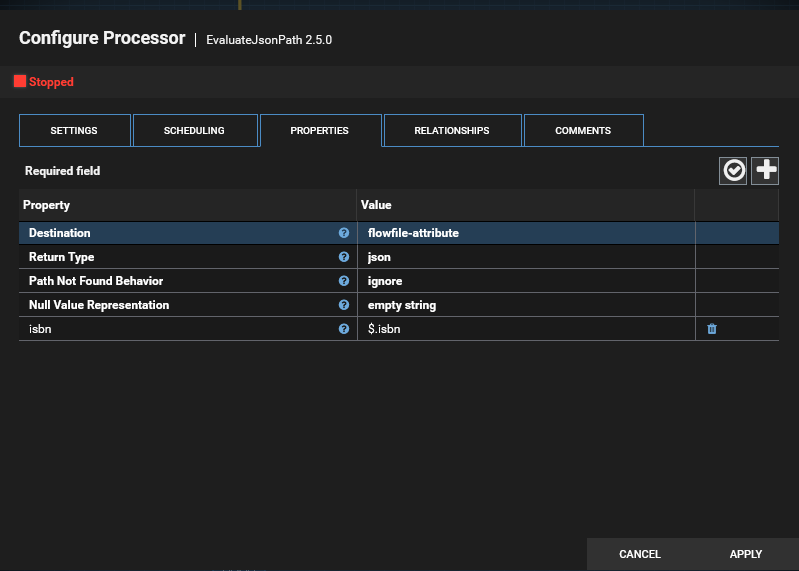
For basic, root level, queries we can use the syntax of $.key to pull that key. If we want the isbn attribute from the above JSON our JsonPath query is $.isbn
In Clockspring, this is as simple as naming your attribute, the providing the JsonPath query to find that value in the JSON document. In the below example we are storing the Key-Value pair as an attribute and naming the attribute isbn
Now if we'd like to pull out the author's first name into an attribute named author_first we would have to add to our query and use $.author.firstname to match the JSON document
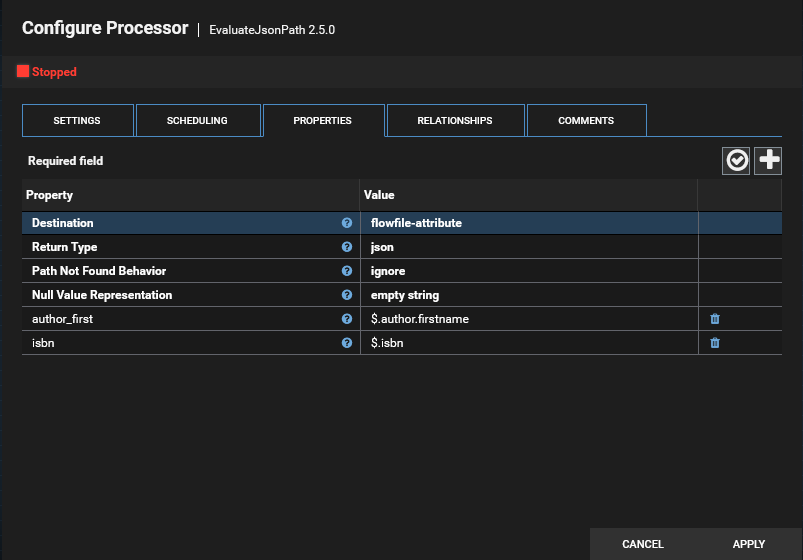
You can then add as many JsonPath queries as necessary to pull out the information you'd like. You can also pull from arrays with a reference to the array section.
For example - if I wanted to pull the first value out of the category array I can use $.category[0] which will resolve to Non-Fiction in this scenario.
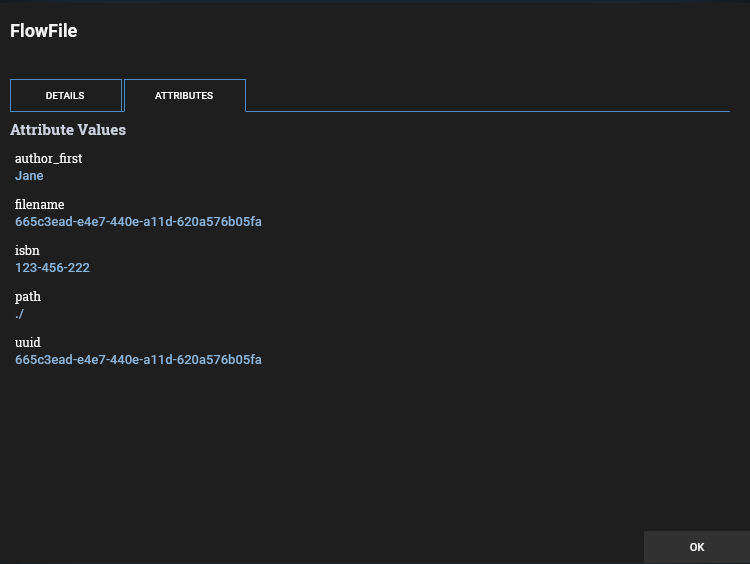
Once we have run our processors, you can see the data that was pulled by looking at the attributes of the flowfile.
Was this article helpful?
That’s Great!
Thank you for your feedback
Sorry! We couldn't be helpful
Thank you for your feedback
Feedback sent
We appreciate your effort and will try to fix the article