Handling Paginated API Results in Clockspring
Many REST APIs return results in pages instead of a single response. To retrieve all records, you must repeatedly call the API until no additional pages remain.
This article shows a beginner-friendly pagination pattern in Clockspring that works across most APIs and is easy to understand, debug, and adapt.
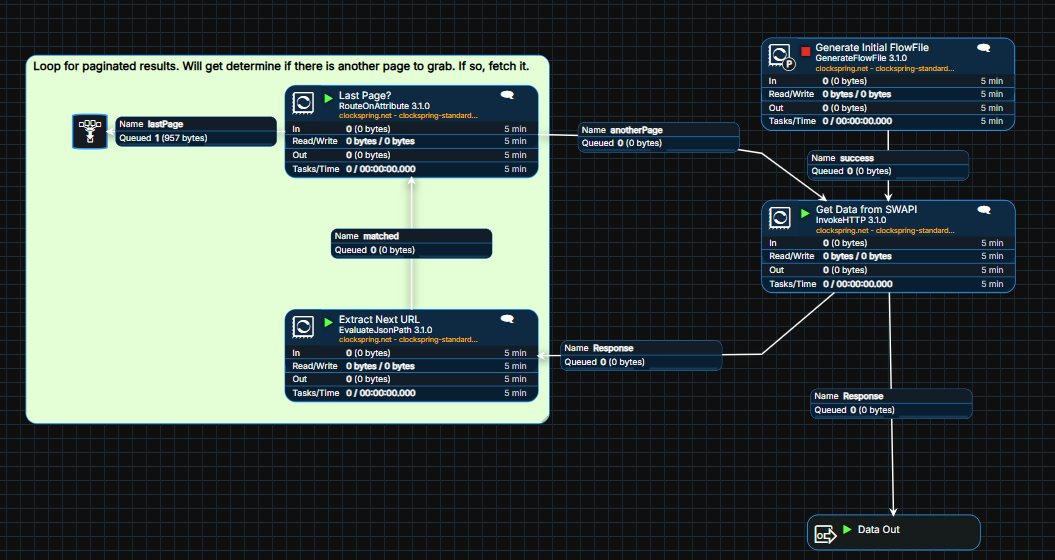
The Core Concept
Pagination in Clockspring is driven by attributes, not loops or code.
The flow follows a simple rule:
Call the API using a URL stored in a FlowFile attribute
Parse the response and overwrite that same attribute with the next page URL
Decide whether to loop again based on whether the URL exists
When the URL is empty, pagination is complete.
High-Level Flow Pattern
A typical pagination flow includes:
GenerateFlowFile to create the initial request
InvokeHTTP to call the API
EvaluateJsonPath to extract the next page URL
RouteOnAttribute to loop or exit
Each page of data is processed exactly once.
Step 1: Create the Initial Request
Use GenerateFlowFile to create a single FlowFile that starts the process.
Set the starting API endpoint as an attribute.
Example:
Attribute name:
urlValue:
https://swapi.dev/api/people
This FlowFile acts as the control token for the entire loop.
Step 2: Call the API Using the URL Attribute
Configure InvokeHTTP to read the request URL from the FlowFile attribute.
Key settings:
HTTP Method: GET
HTTP URL:
${url}
InvokeHTTP stays unchanged throughout the loop. Only the FlowFile attribute changes.
Step 3: Parse and Overwrite the Next Page URL
After the API call, use EvaluateJsonPath to extract the pagination pointer from the response and write it back to the same url attribute.
Example configuration:
Destination: flowfile-attribute
Return Type: json
Path Not Found Behavior: ignore
Dynamic property:
url =
$.next
Results:
If another page exists,
urlis updated to the next page URLIf no page exists,
urlbecomes empty
This step always runs, regardless of whether another page is present.
Step 4: Decide Whether to Loop or Exit
Use RouteOnAttribute to determine whether pagination should continue.
Example rule:
lastPage:
${url:isEmpty()}
Routing:
Not lastPage: route back to InvokeHTTP
lastPage: route to a terminal or downstream path
This keeps the loop explicit and prevents infinite execution.
Step 5: Process Each Page’s Data
The API response can be routed in parallel to downstream processors for:
Writing records to a database
Extracting results arrays
Transforming or enriching data
Each page is processed independently as it flows through the loop.
Common API Variations
While APIs differ, this pattern rarely changes. Usually only these details vary:
The JSONPath used to extract the next page
Whether pagination uses:
A full URL
A page number
A cursor token
The loop structure remains the same.
Common Mistakes to Avoid
Forgetting to overwrite the URL before routing
Missing or incorrect JSONPath expressions
Treating
nulland empty values the same without checkingUsing retries instead of pacing for rate limits
If a flow loops forever, the pagination condition is almost always the issue.
Why This Pattern Is Recommended
Easy to understand and explain
Simple to debug using attributes
Works with most REST APIs
Avoids complex state or custom scripting
This is the safest starting point for new Clockspring users working with paginated APIs.
Summary
Paginated APIs in Clockspring are handled by updating a URL attribute and routing based on its presence.
One request, one update, one decision. Repeat until complete.
Once you understand this pattern, adapting it to new APIs is usually just a matter of changing the JSONPath to grab the proper nextPage URL.
Was this article helpful?
That’s Great!
Thank you for your feedback
Sorry! We couldn't be helpful
Thank you for your feedback
Feedback sent
We appreciate your effort and will try to fix the article