Summary
Clockspring processors use attributes to evaluate dynamic values at runtime. Expression Language (EL) lets you reference and manipulate attributes inside processor properties. Understanding how EL works is essential for routing, building filenames, calling APIs, and transforming data.
Expression Language: what it does
Expression Language allows you to insert attribute values into processor properties using ${...} syntax.
At runtime, for each FlowFile:
EL reads attributes
Substitutes them into the property string
Produces a final value used by the processor
If an attribute is missing, EL may resolve to an empty string, a default value, or cause validation/failure depending on the processor.
Attributes are always strings
EL operates purely on string values.
If you need numeric comparisons or conversions, EL provides functions to handle that, but the underlying values are still strings.
Examples:
${fileSize:gt(1000)}${http.status.code:equals("200")}${record.count:toNumber()}
Where EL is used
Expression Language appears in many processor properties, including:
Routing rules
Filenames and paths
Database queries
API endpoints
Property-based lookups
Cache keys
SQL parameterization
Record selection
Each property that supports EL shows a checkmark next to 'EL'
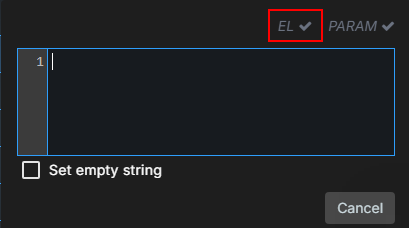
If a property supports ${} syntax, the processor evaluates EL per FlowFile.
How a property gets its final value
A processor property can contain:
A literal value
EL only
A mix of literal text + EL
Example:
API endpoint:https://api.example.com/customer/${customer.id}
Filename:${filename:toUpper():append(".processed")}
Routing rule:${recordCount:gt(0)}
Clockspring evaluates the EL fragments at runtime using the FlowFile’s attributes.
EL evaluation happens per FlowFile
This is a fundamental concept.
Even if a processor receives 1,000 FlowFiles at once:
Each FlowFile resolves its own EL
Values may differ depending on attributes
This allows two FlowFiles in the same processor to follow different routes or build different filenames.
When EL is not allowed
Some processor properties explicitly do not support EL.
In these cases:
EL is not evaluated
${}is treated as literal text
Each property that does not support EL shows a circle with a line going through it:
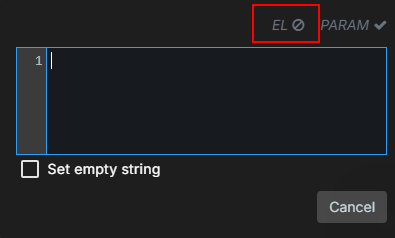
The processor UI always indicates whether a property allows EL.
Common mistakes
Missing attribute
${customer.id} resolves to nothing if customer.id doesn’t exist.
This often breaks URLs, filenames, or routing rules.
Assuming EL works everywhere
Some processors require literal values, not EL.
Overusing attributes for content
Do not store large JSON blobs or entire messages in attributes.
Extract only what you need.
Forgetting that everything is a string
Comparisons must be explicit:${size:gt(100)} not ${size > 100}
Debugging EL issues
When something doesn’t evaluate correctly:
Check the FlowFile’s attributes
Confirm the attribute you expect actually exists
Confirm the property supports EL
Look at the resolved value in provenance (many processors record it)
Test EL fragments using the processor’s built-in EL tester (where available)
Quick rules to remember
EL reads attributes and produces strings
EL runs per FlowFile
Not all properties support EL
Missing attributes = missing values
Use EL for dynamic behavior; use parameters for environment values
Related Articles
FlowFile Content vs Attributes
How Attributes Move Through a Flow
Best Practices for Attributes
Expression Language Reference (in Reference category)
Was this article helpful?
That’s Great!
Thank you for your feedback
Sorry! We couldn't be helpful
Thank you for your feedback
Feedback sent
We appreciate your effort and will try to fix the article