There are scenarios where you may want to take attributes associated with your flowfile and store them in a JSON format. This is especially common after collecting data from multiple locations then attempting to send consolidated output to another destination.
This processor has 5 different properties:
Attribute List
Add a comma separated list of attributes you would like to have in our output JSON
Attributes Regular Expression
This provides a more advanced method than the static Attribute List property so that you can write a regular expression and any matching attributes will be put into the JSON document.
Destination
You can send the created JSON to either the flowfile's content or store it as an attribute
Include Core Attributes
This includes additional attributes that are used by Clockspring itself, but not user or processor written. These include attributes such as uuid, path, mime-type, etc.
Null Value
If a selected attribute does not exist in the list of attributes, the output JSON can either provide a blank string "" or it can provide a null value. Setting this to false provides a blank string, where setting it to true will provide the null value.
Example:
Lets start with a flowfile with the following attributes:
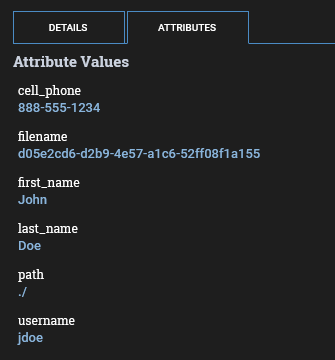
Now we want to replace the flowfile content with a JSON document containing the values of first_name, last_name, username, and cell_phone. We can do this multiple ways using this processor, but will start with a simple comma separated list:
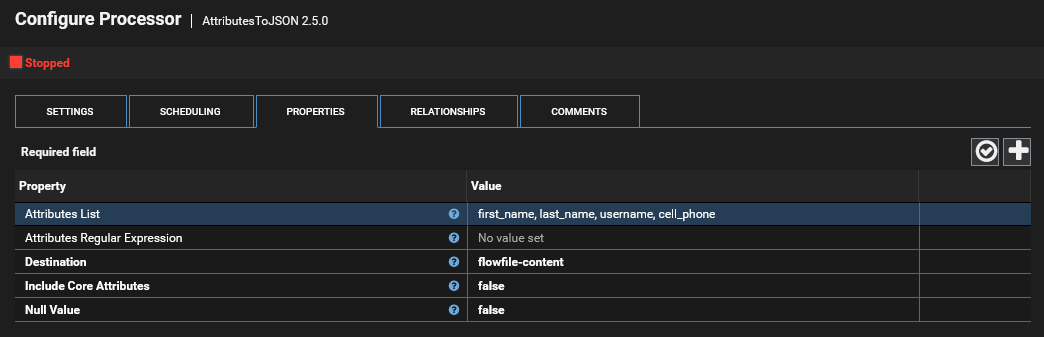
Running this processor gives us the following output:
{
  "last_name" : "Doe",
  "first_name" : "John",
  "username" : "jdoe",
  "cell_phone" : "888-555-1234"
}
We could also use a regular expression and try to grab only those that match the string name
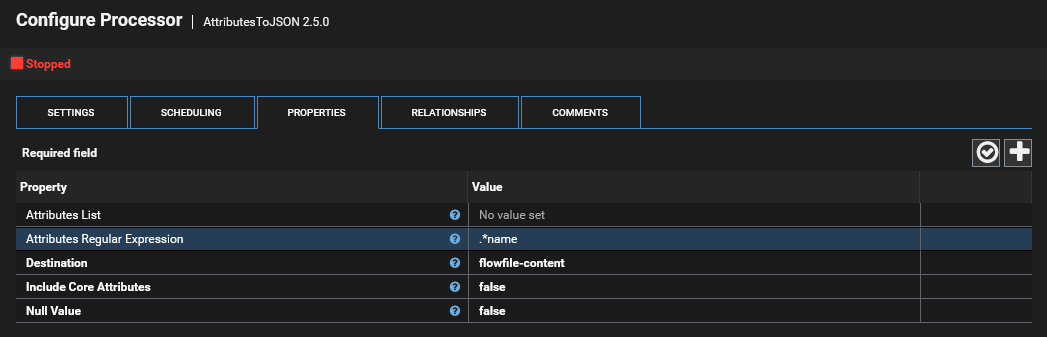
This gives us the following output:
{
  "last_name" : "Doe",
  "first_name" : "John",
  "username" : "jdoe"
}
Also note that you can use Parameters and/or Expression Language on this expression as well to get really creative with your attribute matching.
Was this article helpful?
That’s Great!
Thank you for your feedback
Sorry! We couldn't be helpful
Thank you for your feedback
Feedback sent
We appreciate your effort and will try to fix the article