In order to best understand when and where to use GenerateFlowFile it is important to note that some processors can generate their own flowfiles from scratch (think InvokeHTTP, GetHBase, etc) while others are not able to generate all new data (think of SplitJson, ExtractAttributes, etc). For those that cannot generate their own flowfiles, you must pass it at least one flowfile to begin processing.
Many of these processors are commonly used in the middle of a flow, but sometimes you need to generate a new flowfile to be processed. This is where GenerateFlowFile comes in.
GenerateFlowFile allows you to create one or many flowfiles to start a new flow. You may choose to use this processor in test scenarios to simulate input sources that are not currently available or it can be used to start a production flow with some static content.
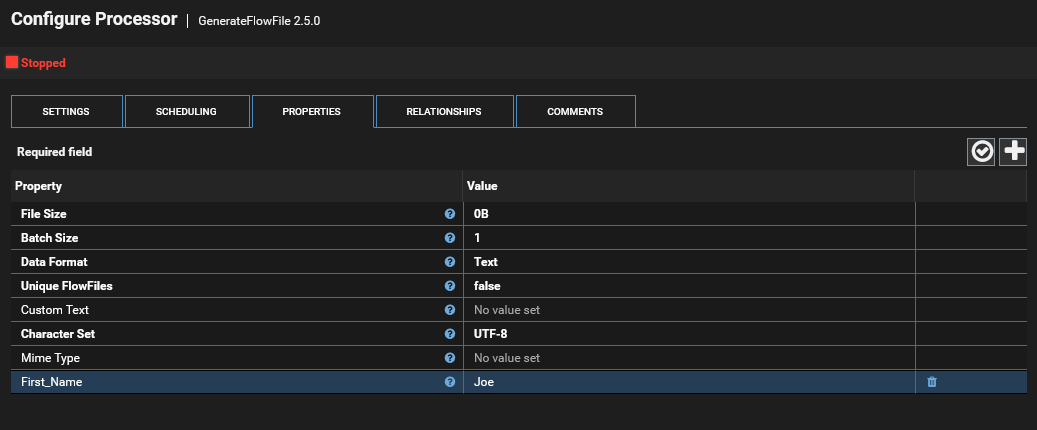
There are 7 different properties that impact how these are generated:
File Size
The GenerateFlowFile processor can create the flowfiles with a specified size using random data. By default this is set to 0B which means it will not try to fill the flowfile at all, simply send the data as specified in the Custom Text property below or just sent a 0B (empty content) flowfile.
Batch Size
Each time the processor runs it will create the number of flowfiles specified by this property.
Data Format
When using a file size >0B the processor fills the flowfile content with random data. This format property can be configured to use random text or random binary information
Unique FlowFiles
If you would like the content being generated to be unique within each flowfile created by GenerateFlowFile, set this property to yes. Please note that making this data unique should only be used when uniqueness is truly necessary as it forces the processor to generate new date for each flowfile which will slow down the performance of the processor.
Custom Text
This is one of the most commonly used fields within GenerateFlowFile. Here you can enter text that will be used for the content of the flowfile.
One real world example of using this is that if you want to test your flow with specific content in the flowfile you can use this processor to feed the flow with data you specify.
Character Set
By default all generated data is created with the UTF-8 character set, but if you need to use another character set then this can be changed to the proper type.
Mime Type
If you would like to set a specific mime type, then you can enter that value here
Custom Properties as Attributes
Beyond just those properties shown above, you can click the plus icon in the corner and add additional properties which will then be used as Key-Value pairs and written as an attribute to the generated flowfile.
Lets say I want to generate a new flowfile and put an attribute on that flowfile with the Property of "First_Name" and the value of "Joe"
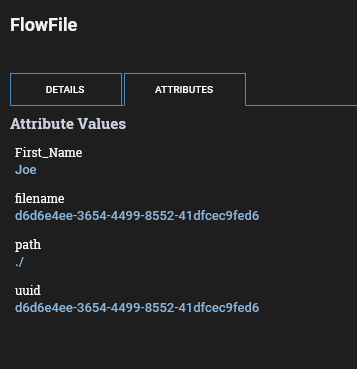
This then creates a flowfile with that as an attribute:
Please also remember to edit the scheduling for this processor before starting. GenerateFlowFile is very fast and if you keep the default run schedule of 0 seconds it will quickly generate thousands of flowfiles!
Pro Tip: GenerateFlowFile can use Expression Language to help with passing information to another processor. Let's say that you want to query a remote API and pass it a start time of 24 hours ago in the URL. We can create an attribute named 24_hours_ago and using expression language get a time that was 24 hours before the flowfile was generated
${now():toNumber():minus(86400000)}Now our output flowfile will have an attribute named 24_hours_ago which has the time since epoch for 24 hours ago. We can actually convert this to a readable date (or any other format you may need)
${now():toNumber():minus(86400000):format("yyyy/MM/dd-HH:mm:ss")}Was this article helpful?
That’s Great!
Thank you for your feedback
Sorry! We couldn't be helpful
Thank you for your feedback
Feedback sent
We appreciate your effort and will try to fix the article