Commonly you will want to send flowfiles down different paths based on the value of an attribute. The RouteOnAttribute processor is designed for this exact scenario.
This processor has a single property by default:
Routing Strategy
This property determines the criteria the processor will use to send flowfiles down a defined path. The 3 strategies are:
| Strategy | Definition |
| Route to Property name | This is the default routing strategy and allows you to define N number of new properties. A new relationship will be created for each new property. If the expression evaluates to 'True' then the data will be sent down the relationship with the property name defined. |
| Route to 'matched' if all match | This setting will send the flowfile down the 'matched' relationship if all expressions in the configuration evaluate to 'True' |
| Route to 'matched' if any matches | This setting will send the flowfile down the 'matched' relationship if any expression in the configuration evaluates to 'True' |
In all examples below we will assume we have a a flowfile with the following attribute:
| Attribute | Value |
| food | tacos |
| color | green |
Route to Property Name:
We will define 2 new properties in the processor configuration:
| Property | Value |
| pizza | ${food:equals('pizza')} |
| tacos | ${food:equals('tacos')} |
If we set the RouteOnAttribute processor strategy to Route to Property Name and run it against the flowfile it will use the following logic:
- If the "food" attribute is set to "pizza" we will transfer the flowfile down the relationship named "pizza".
- If the "food" attribute is set to "tacos" we will send it down the "tacos" relationship.
- If the "food" attribute is set to any other value than the 2 defined, it will be routed down the "unmatched" relationship.
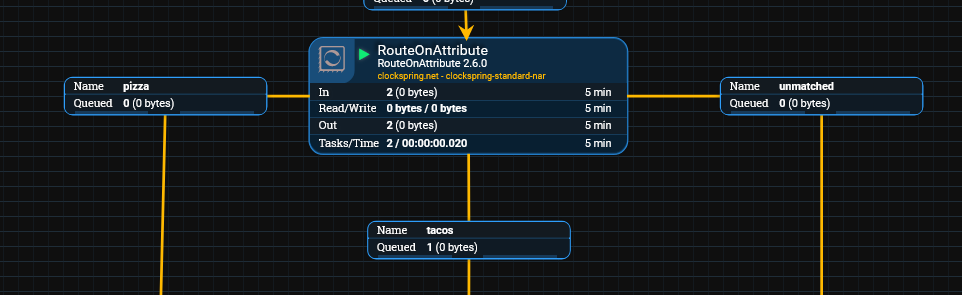
Route to 'matched' if all match:
Unlike the prior example where each property creates a new relationship, this method uses only 'matched' and 'unmatched' relationships. If all properties created in the processor evaluate to 'True' then the flowfile will be sent down the 'matched' relationship. Otherwise the flowfile will be sent to the 'unmatched' relationship.
As we have the processor checking for the same attribute being set to two different values, there is no way for the prior configuration to ever resolve to match, so lets update our criteria for the processor:
| Property | Value |
| pizza | ${food:equals('pizza')} |
| color | ${color:equals('green')} |
With our flowfile attributes set to the "tacos" and "green" this processor will route the flowfile to the unmatched relationship as the "food" attribute does not match

Route to 'matched' if any matches
Similar to the example above, this configuration will use only the 'matched' and 'unmatched' relationships. However, in this scenario if any expression resolves to 'True' the flowfile will be routed to the 'matched' relationship.
If we run the same flowfile through this updated processor, it will now be sent down the 'matched' relationship as the color attribute is set to "green"

Was this article helpful?
That’s Great!
Thank you for your feedback
Sorry! We couldn't be helpful
Thank you for your feedback
Feedback sent
We appreciate your effort and will try to fix the article